Communications Process Flow
Each communication results in the communication being sent to one target. Multiple targets, such as sending an email to all subscriptions on an account In the Cloud Monetisation Platform, a billing entity that can be used to manage payments on one or more subscriptions or payments for services. An account can hold details such as payments or invoices., is not currently supported. The main avenue for creating communciations in CMP Converged Monetisation Platform. The MDS Global product that supports customer care and billing for digital service providers. are Comms Requests, which are entries in the CommsRequestHeader table.
Click through the slideshow below for an overview of the communications process. The sections that follow the slideshow go into the process in more detail:
Step 1: A communication request is triggered
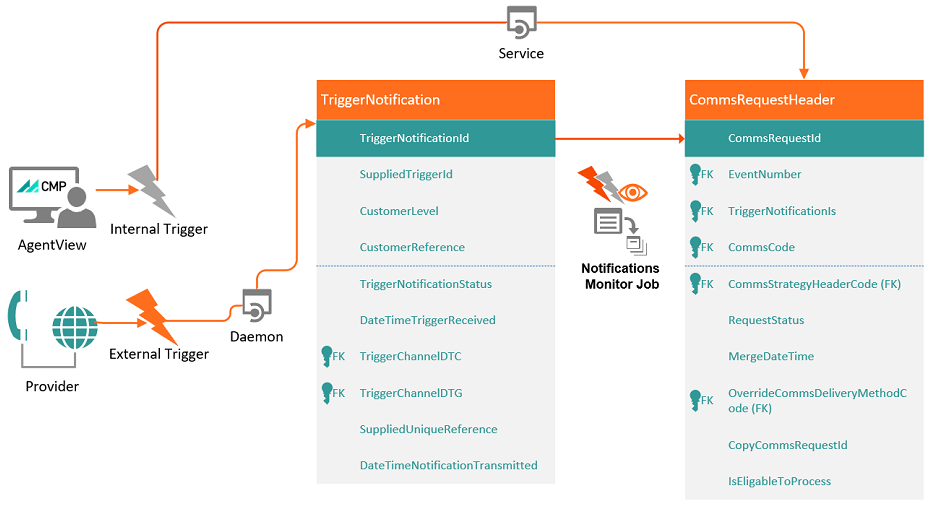
The Communications process starts when a communication request is triggered. A trigger can be:
- Internal - for example a CMP workflow event, raised either manually or automatically.
- External - a request from an external system. A communication request can be created automatically on receipt of a notification from an external system.
When a trigger is invoked, CMP creates an entry in the core table in Communications, the CommsRequestHeader table.
When a Workflow Event is created, irrespective on whether the WhenToCreate is set to OnCreate or OnResolve, an entry in created in the CommsRequestHeader table.
For more information, see Comms Process Flow: Triggers
Step 2: Communication details are gathered
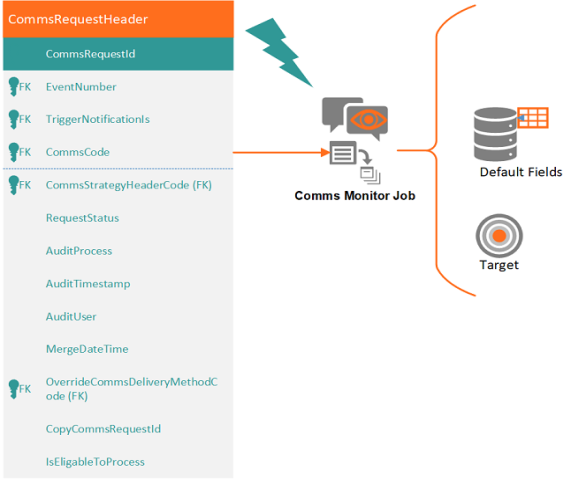
When an entry is created in the commsRequestHeader table, the Comms Monitor Job is triggered to process the CommsRequestHeader and produce a commsRequestDetail entry. This job:
- Works out the appropriate delivery method and target, for example a mobile number, email address etc.
-
Derives the values of the default fields that are associated with the communication.
- In the case of push notifications, online notifications and SMS Short Message Service.
A text messaging service component of most mobile telephone systems. SMS uses standardized communication protocols to enable mobile phone devices to exchange short text messages. delivery methods, the job also merges the data of the derived fields with the message template to produce the actual message. For letters and email, this merging is carried out by separate jobs.
For more information, see Comms Process Flow: Gather Details
Step 3: SMS, push and external notifications are sent
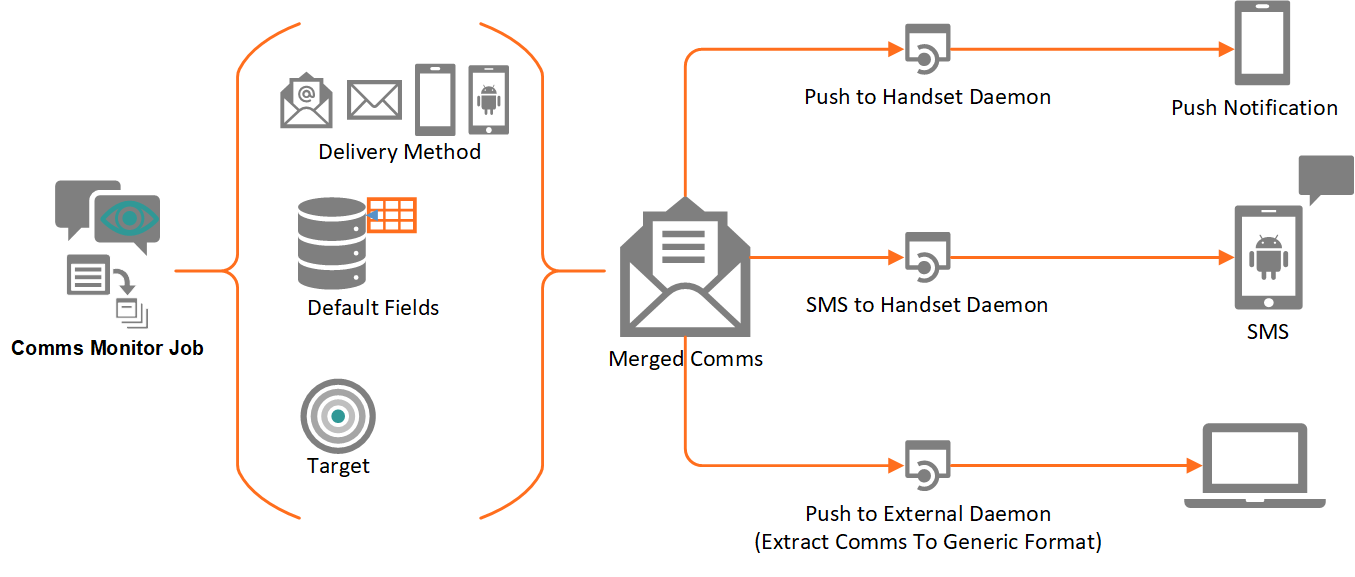
After the Comms Monitor Job has completed, dedicated daemons pick up the requests to distribute them to the destination:
- Comms Push To Handset daemon A computer program that runs as a background process, rather than being under the control of an interactive user.
- Comms SMS To Handset daemon
- Push To External daemon (Extract Comms to Generic Format daemon)
For more information, see Comms Process Flow: Send SMS, Push and External Notifications.
Step 4: Letters and emails are created and sent
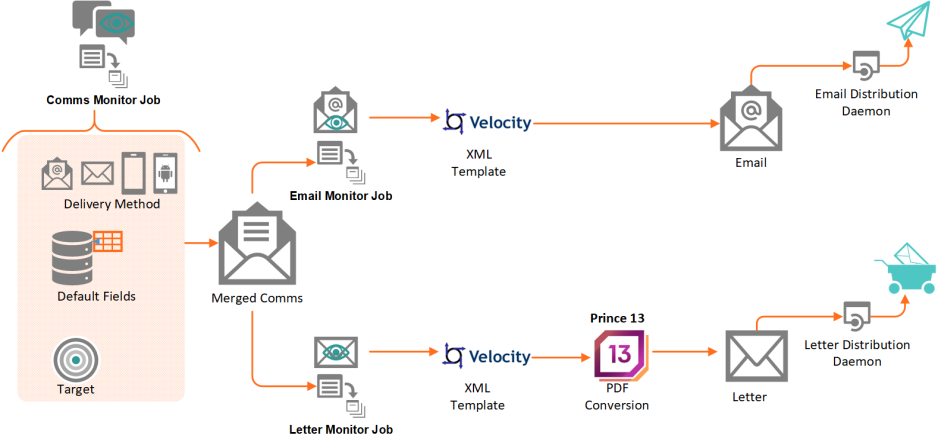
The Comms Email Monitor and Comms Letter Monitor jobs are triggered automatically when the Comms Monitor job has finished gathering data for Comms Requests relating to emails or letters. For more information, see Comms Process Flow: Create and Send Letters and Emails
These jobs uses external frameworks - for example, Velocity and Prince XML Exstensible Markup Language. A markup language used to describe data that allows users to define their information formats, especially in order to display documents on the Internet. - to generate documents. Generated documents are subsequently detected by the following downstream daemons for transmission to the customer In the context of the Cloud Monetisation Platform, an individual or organisation who has signed an agreement to take goods and services from a service provider. A customer receives a bill associated with one or more subscriptions, and can be a single end user or a large company with many subscriptions assigned to one agreement.:
- Transmission Comms to Print Bureau daemon (Letter distribution)
- Transmission Comms to Email daemon (Email distribution)
For more information, see About Email and Letter Templates
Step 5: Letters and Emails are Stored
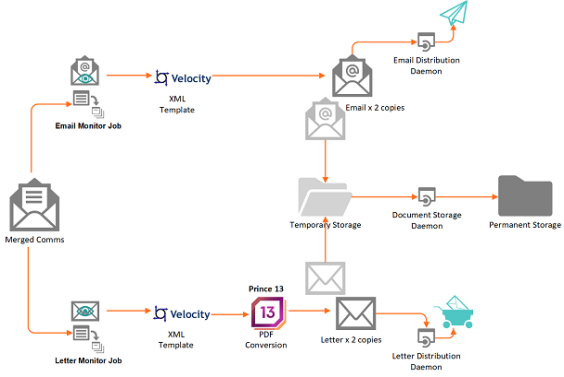
For more information see Comms Process Flow: Store Letters and Emails.
External Systems Update Communications Status